private speech-to-text, across the machines you own

one voice.
every machine.

Voca is a family of free and open-source speech-to-text apps for desktop and phone. Speak into the field already in front of you, keep the model close, and choose the path that fits your hardware.

on-device firstgateway optionalopen source

Linux·macOS·Windows·iPhone·Android·Gateway·on-device·open source·Linux·macOS·Windows·iPhone·Android·Gateway·on-device·open source

the same promise, wherever you work

A quieter way to get words out.

Voca keeps the gesture simple and the boundary visible: speak, choose where the speech-to-text model runs, and get text back in the place you were already typing.

Speak where you already work.

Hold a hotkey or tap the phone control. Voca listens, transcribes, and puts the words where your cursor is when the platform supports it.

Choose where the model runs.

On-device mode is the simplest path: download a speech-to-text model and process there. If you want shared or larger compute, connect to a VocaGateway you run yourself.

Keep the same privacy bar.

No required Voca account. Open-source code. Honest status labels. When audio moves to a configured gateway, the page tells you exactly where it goes.

the family directory

Find the Voca for your machine.

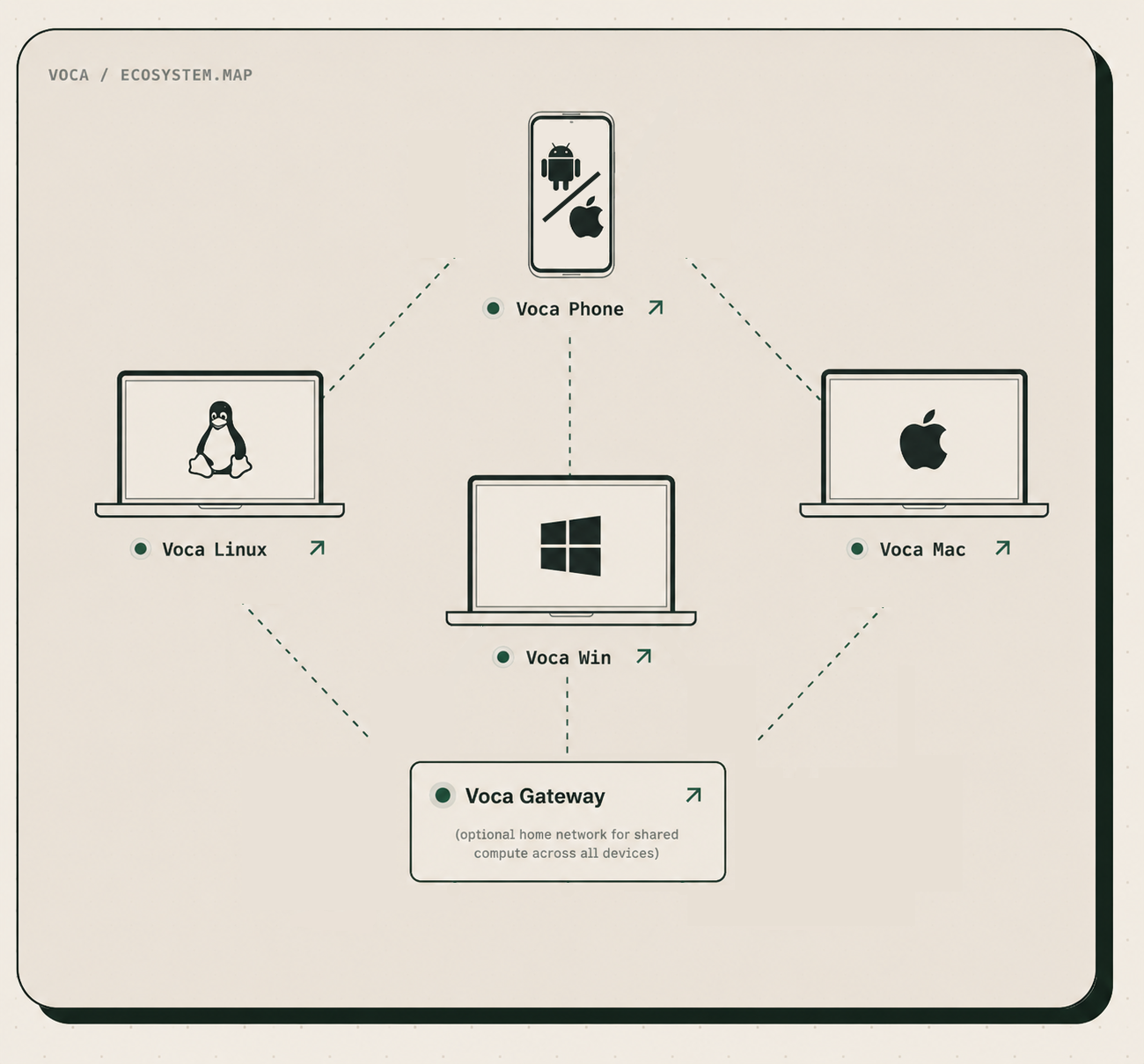
Pick the surface you use today. Each card tells you what is actually available, what it runs on, and where to go next.

Linux available now

VocaLinux

System-wide voice typing for real Linux desktops. Choose whisper.cpp, Whisper, or VOSK on X11 or Wayland.

runs on Linux · X11 + Wayland · AGPL-3.0

macOS beta

VocaMac

A native menu bar app for Apple Silicon Macs. Hold a hotkey, speak, and text appears at the cursor through WhisperKit.

macOS 14+ · Apple Silicon · Homebrew or DMG · AGPL-3.0

iPhone + Android beta / testflight

VocaPhone

A private voice keyboard for phones. Android has public beta releases; iPhone is a public TestFlight beta capped at 1,000 seats, or build from source for iOS 17+.

Android 13+ beta · iOS 17+ TestFlight (1,000 seats) or source build · gateway optional · AGPL-3.0

Windows beta

VocaWin

Unsigned Windows beta. SmartScreen will warn because the publisher is not signed. Download it, try it, and file issues.

latest tagged v0.1.1-beta · unsigned NSIS · not a signed shipping build · AGPL-3.0-or-later

infrastructure beta

VocaGateway

Self-hosted shared compute for Voca clients. Run it on a Mac, Linux machine, or Linux container, pair with a QR code, and keep control of the host.

tagged try v0.1.0 · native macOS or Linux · Docker Compose on Linux amd64/arm64 · no packaged installer · AGPL-3.0

path / choose-your-boundarygateway optional

on-device or your gateway · you choose the hardware

On this device.
Or your gateway.

VocaGateway is optional infrastructure for shared or larger compute. It is self-hosted, not a Voca cloud. Pair it with a QR code, run it on a trusted machine, and keep the network boundary explicit.

Explore VocaGateway
On this device

After the model download, audio and speech-to-text processing stay on the phone or computer.

on-device after the model is present
Your VocaGateway

Your client sends audio to the gateway you configured. It runs a local engine and returns the transcript.

your host · your boundary

Gateway mode is not on-device: configured audio leaves the client for your self-hosted gateway. Use a trusted LAN, an encrypted private network, or HTTPS.

voca / principles.txtpublic

the manifesto

Small tools.
Clear boundaries.

There is rigor underneath the playful paper and window chrome.

  1. 01On-device first.

    On-device speech-to-text is the primary path.

  2. 02Free and open source.

    Read the code and the license for each project.

  3. 03Text lands where you type.

    The point is the focused field, not another dashboard.

  4. 04No required account.

    Your Voca setup should not need a Voca login.

  5. 05Honest status.

    Developer alpha, beta, source build, coming soon, and early mean different things.

  6. 06Built in public.

    Issues, pull requests, and contributions are welcome.

where this is going

A status surface,
not a promise machine.

Follow the repositories for live progress. We do not put dates on work that has not been committed.

available nowVocaLinuxrelease path · Linux desktop
betaVocaMacdesktop beta · Apple Silicon
beta / testflightVocaPhoneAndroid beta · iOS TestFlight (1,000 seats)
betaVocaWinunsigned installer · latest tagged v0.1.1-beta
betaVocaGatewayself-hosted shared compute · tagged try v0.1.0

a precise privacy promise

Your voice has a path.
We show you which one.

On-device mode: after the model is downloaded, the speech-to-text model and audio processing remain on the phone or computer.

Gateway mode: when you deliberately configure a VocaGateway, audio leaves the client for the self-hosted machine you chose. Use a trusted LAN, encrypted private network, or HTTPS.

no required Voca account · open source · explicit network boundary

questions, answered plainly

Before you pick a platform.

Does my voice stay on my device?

In on-device mode, yes: after the model download, processing remains on the phone or computer. If you choose gateway mode, configured audio travels to your self-hosted VocaGateway instead.

Do I need VocaGateway?

No. The gateway is optional. Use it when you want shared hardware, larger models, or one self-hosted service for multiple clients.

Which Voca app should I use?

Choose VocaLinux for Linux, VocaMac for an Apple Silicon Mac, VocaPhone for Android or iPhone via TestFlight, and VocaWin on Windows if you want to try the unsigned beta.

Does Voca work in every app?

The desktop apps are designed for system-wide text insertion, and the phone apps work through their keyboard or containing app flows. Secure fields, permissions, and platform rules can limit insertion.

Is Voca free and open source?

Yes, the Voca projects are free and open source. Licenses are named per project in the repository and in the product directory above.

Which products can I install today?

VocaLinux has a current release, VocaMac has a beta release path, and VocaPhone has public Android beta releases plus a public iOS TestFlight beta capped at 1,000 seats, with a source-build path beyond that. VocaWin has an unsigned beta, not a signed shipping build. VocaGateway is beta self-hosted infrastructure.

How can I contribute?

Join the Discord, read the project source, open an issue, improve documentation, or send a pull request through the VocaHQ GitHub organization.

come build the family

The next good idea
can start with a pull request.

Choose a platform, read the source, report what you find, and help make private speech-to-text feel ordinary everywhere. Discord is the fastest feedback loop if you want to build this with us.

An animated code contribution moving from an idea through review to a merged pull request